Easy Todo Note: a side panel todo list with a built-in pomodoro timer
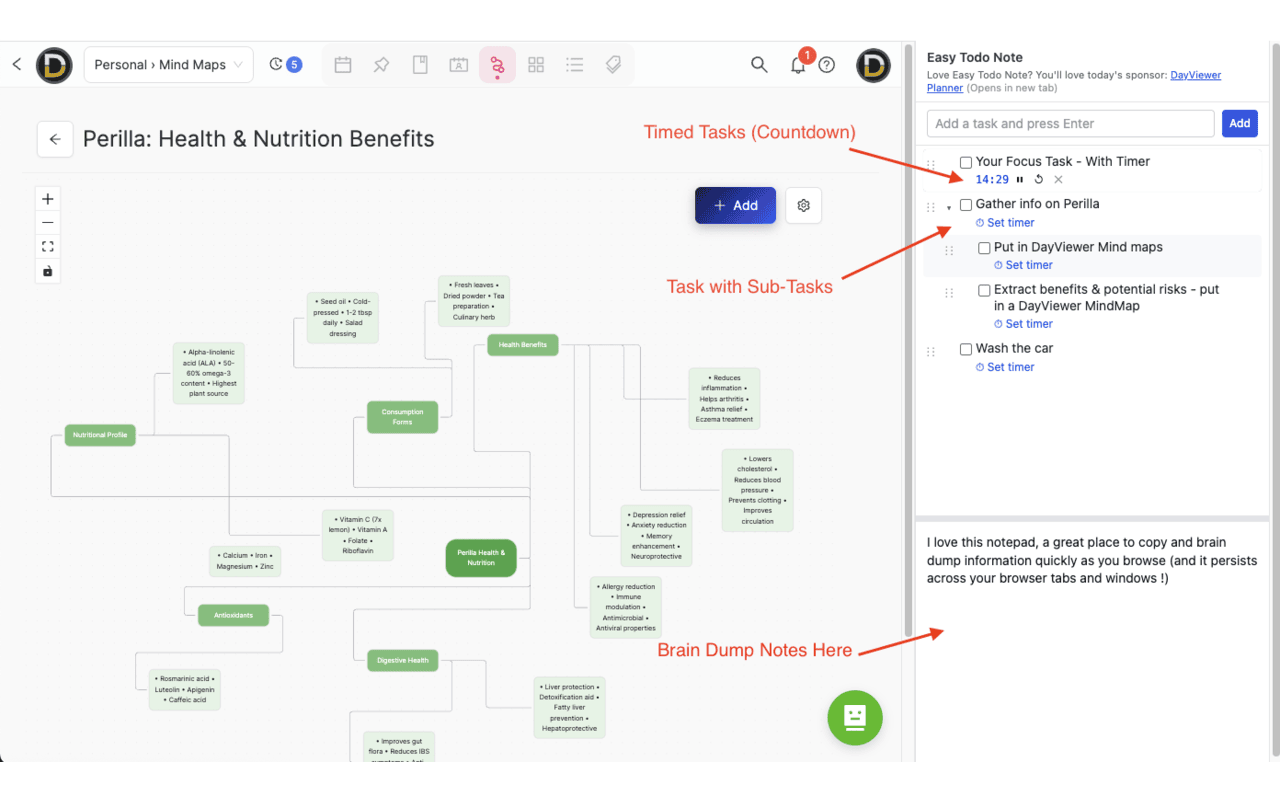
If sticky notes and full-blown project apps both fail you, this is the in-between: a free Chrome side panel todo list with subtasks, drag-and-drop, and per-task countdown timers — open in one click, no account, no tracking.
Who this is for
Easy Todo Note is built for people whose work happens in the browser and whose attention doesn't stay still: developers between tickets, writers between tabs, students juggling course pages, and ADHD brains who lose a thought the second it has to wait. If you've ever tried to use a full project-management tool for a five-item day and felt the friction, you'll feel at home here.
What you can use it for
A pomodoro timer that lives next to your work
Pick a task, hit the 25-minute preset, and go. The running task floats to the top of the list with a pulsing border so you always know what you're meant to be doing. When the timer ends, you get a system notification — even if the side panel is closed or you've switched to another window.
Time-boxing a messy day
Drop the day's tasks in, give each one a realistic duration, and let the timers police the schedule. Easy Todo Note works well as a lightweight time-blocking tool for people who don't want to live in a calendar.
A scratchpad for half-thoughts
The built-in notepad below the list is for the things that aren't tasks yet — a half-formed idea, a URL you'll need in an hour, a phone number you have to read out. Drag the divider to give it as much or as little room as you want.
An ADHD-friendly capture tool
Speed of capture matters more than structure. The side panel is one click away from any tab, the input is the first thing you see, and nothing demands tags, projects, or due dates. Get the thought out of your head before it leaves.
A daily checklist that doesn't follow you home
Because everything is local to the browser profile, your work list stays at work. No syncing to a phone, no app pinging you on a Sunday afternoon.
How it helps you get more done
- One-click access: the side panel keeps your list permanently in peripheral vision, so you stop forgetting what you were doing every time a tab swallows your attention.
- Subtasks done right: break a vague "finish report" into the three real steps it contains and check them off as you go — momentum is more useful than willpower.
- Visible focus: the active timer pulses at the top of the list, which is a surprisingly strong nudge against opening "just one tab" of something else.
- Friction-free reorder: drag-and-drop between siblings or nested under another task — your list stays accurate as priorities shift.
Privacy & no-account promise
Easy Todo Note is built around the same simple rule as every Cool Easy extension: your data stays on your device. There is no account, no signup, no email capture, no analytics, no telemetry, and no network calls. The only permissions the extension uses are the ones it needs to actually work — local storage, alarms (so timers fire when the panel is closed), notifications (so you hear about it), and the side panel itself.
FAQ
Is Easy Todo Note really free?
Yes — completely free on the Chrome Web Store. No paid tier, no trial, no in-app purchases. Cool Easy is sponsored by DayViewer, which keeps the lights on so the extensions can stay free.
Do I need to make an account or sign in?
No. There is no account, no email required, and no profile. Install it and start typing.
Can I use it as a pomodoro timer?
Yes. Each task has its own countdown with 5, 15, 25, and 60-minute presets (and a custom option). When the timer ends, Chrome fires a system notification — even if the side panel is closed.
Will my tasks sync to other devices?
No. Tasks are stored locally in your Chrome profile so they stay private and offline. If your Chrome profile is signed in and syncs extension storage, your tasks may follow that profile, but Easy Todo Note itself runs no sync service.
What permissions does it ask for?
Just storage, alarms, notifications, and access to Chrome's side panel. It does not read page content and does not request access to any website.